As Office 365 has gotten more popular, it has also become the target of many scam/hack organizations.
Of note, hackers are trying to get users to input their Office 365 Credentials.
- Symbioshare uses Microsoft for credentialing. This means that you will NEVER be asked to enter your username and password from any Symbioshare application directly. Symbioshare will forward you to Microsoft’s login page which is always located at https://login.microsoft.com/…
- When you are logging in, look at the URL in your browser. If it doesn’t have the above URL, DO NOT ENTER YOUR CREDENTIALS.
- Another common problem is Email Phishing Scams.
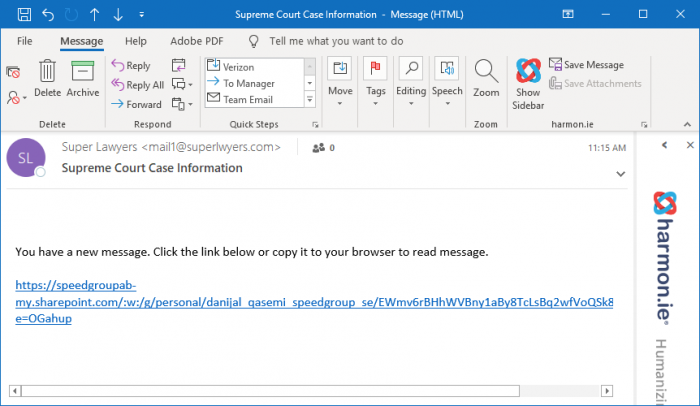
- Example:
I recently received the email below that looks like it is from mail1@superlawyers.com. It states that I have received a new message and to click the link below to read the message. However, the link in the email does not link to superlawyers.com. It links to speedgroupab-my.sharepoint.com/danijal_qasemi_speedgroup_se.
This is the address of a personal OneDrive Account for Danijal Qasemi. The link opens a word document on Danijal Qasemi’s personal one-drive asking for your email system and it will then ask you to enter your Office 365 credentials. In other words, it will be phishing for your Office 365 Credentials if you follow the link.
This is a red flag. Do not trust an email that links you to a url that doesn’t make sense. Microsoft emails should link to Microsoft URLs. Symbioshare emails should link to Symbioshare. OnPoint Legal, or Microsoft URLs.